
We’ve all been there. It’s 11:45 PM, you have a flight to catch in the morning, or a contract that absolutely must be signed and scanned by midnight. You send the document to your printer.
Suddenly, the machine wakes up. It groans. It clicks. And then, one of two tragedies occurs:
- It spits out a page with angry, faded white lines cutting right through the crucial barcode.
- It aggressively flashes a little orange light demanding a $70 cartridge replacement, even though you’ve only printed three grocery lists this month.
Printers are perhaps the only piece of modern technology that can make a perfectly calm adult want to go full Office Space baseball-bat style on an appliance. But most of our printer rage doesn’t actually come from bad hardware. It comes from buying the wrong type of printer for our daily lives.
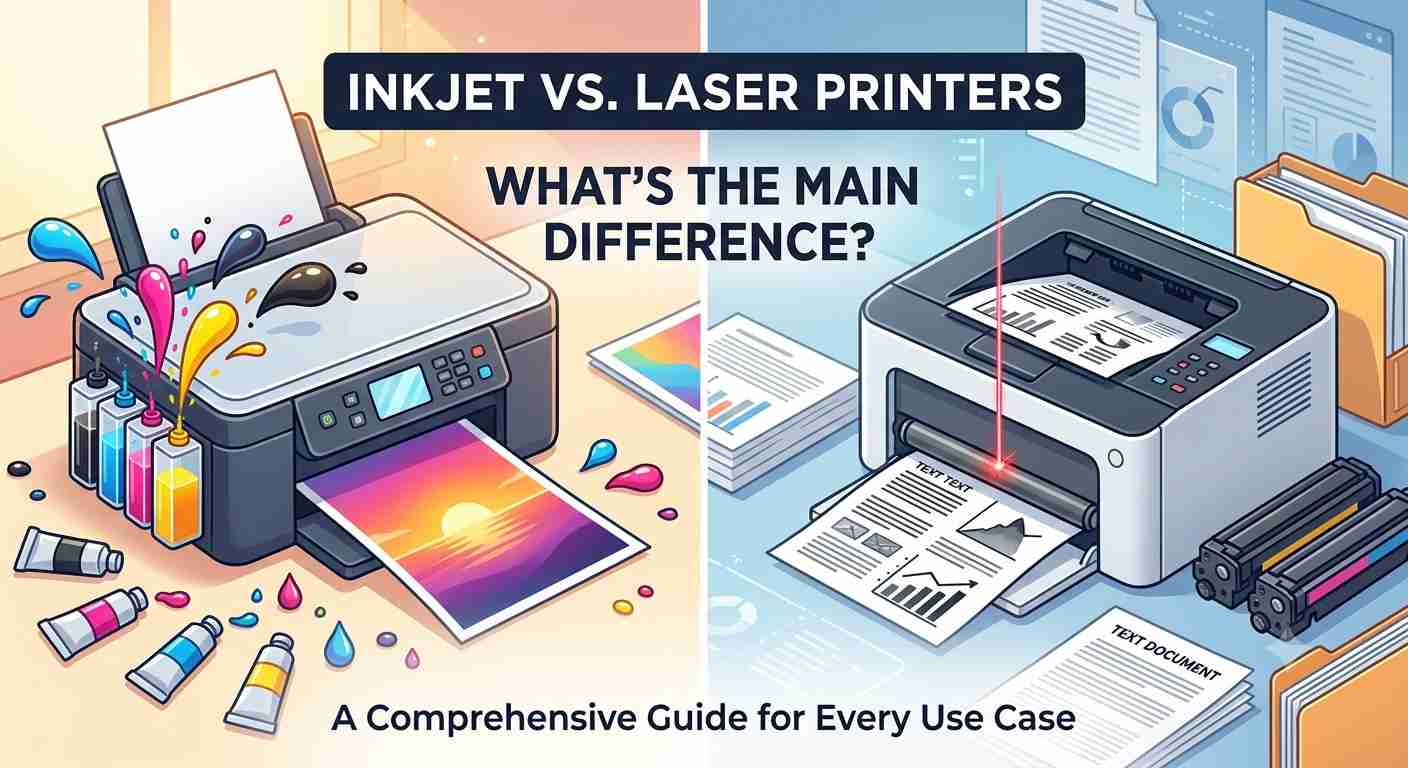
The great printing divide comes down to two classic titans: Inkjet and Laser.
If you’re standing in the electronics aisle (or staring at twenty open browser tabs) trying to figure out which one to buy, take a deep breath. We are going to break down the differences between inkjet and laser printers in plain, human English—no heavy tech jargon allowed. By the end of this post, you’ll know exactly which machine belongs on your desk.
The Core Difference: How They Actually Work
Before we talk about cash, speed, or photo quality, we need to understand the fundamental DNA of these two machines. The easiest way to think about it is this: Inkjets are like painters; lasers are like photocopiers.
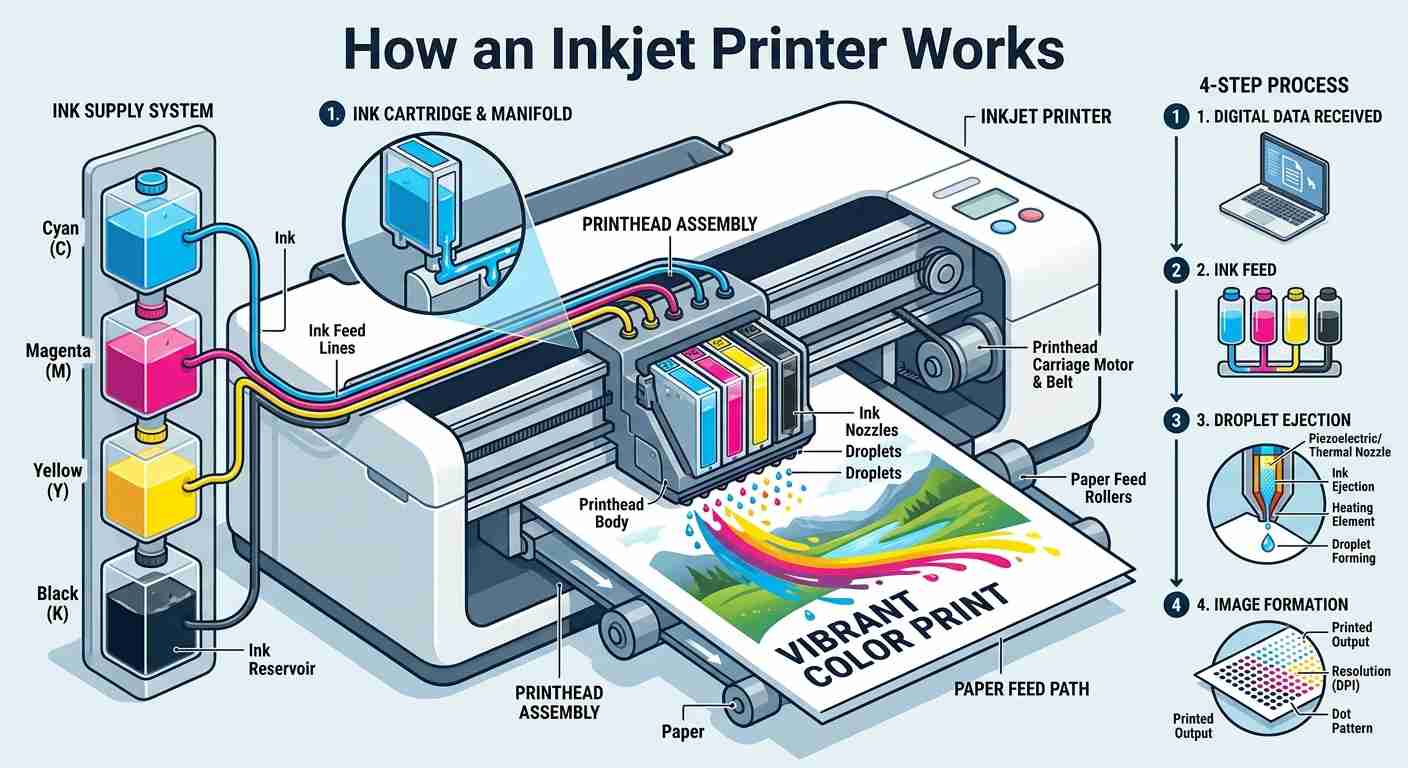
How an Inkjet Printer Works
An inkjet printer is exactly what it sounds like. It uses liquid ink. Inside the machine, there is a print head holding hundreds of microscopic nozzles. When you hit “Print,” this print head zips back and forth across the paper at lightning speed, precisely squirting tiny droplets of liquid ink to form your text or image. Because it uses liquid, the paper often comes out just a tiny bit damp.
How a Laser Printer Works
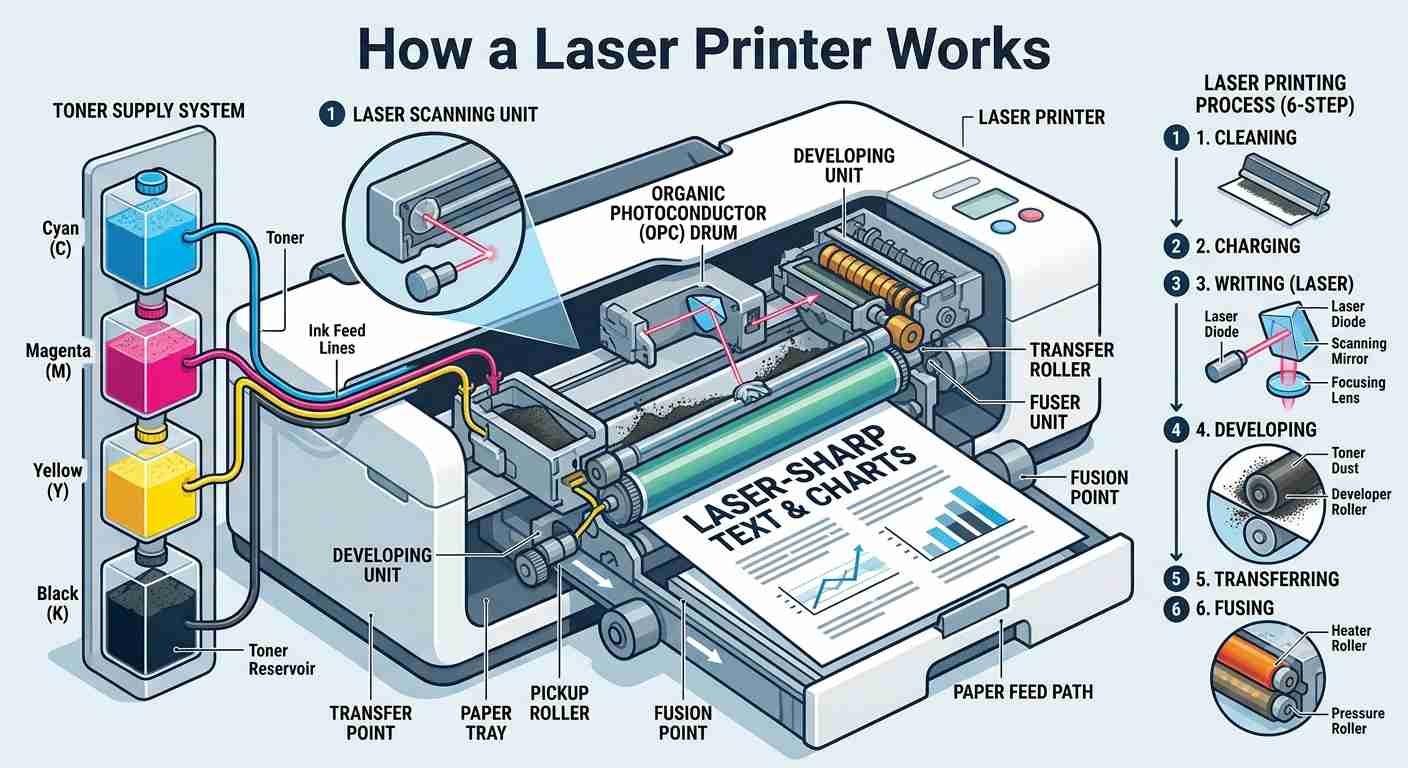
Laser printers defy common sense because they don’t use a single drop of liquid. Instead, they use toner, which is a incredibly fine, plastic-based powder.
Inside a laser printer, a static electricity charge draws the powder onto a cylindrical drum in the exact shape of your document. The paper rolls past the drum, picking up the powder. Then, the paper passes through a “fuser”—which is essentially a tiny, super-hot iron—that melts the plastic powder permanently into the fibers of the page. This is why pages coming out of a laser printer feel warm and crisp.
Round 1: The Upfront Cost vs. The Long Game
Let’s talk about money, because this is where most people get tricked.
+------------------------+------------------------+------------------------+
| Feature                | Inkjet Printers        | Laser Printers         |
+------------------------+------------------------+------------------------+
| Upfront Machine Cost   | Very Cheap ($50 - $150)| Higher ($150 - $400+)  |
| Cartridge Cost         | Medium ($30 - $60)     | High ($70 - $120+)     |
| Page Yield per Refill  | Low (approx. 200-500)  | Massive (2,000 - 5,000)|
| Cost Per Page          | High (Sinks your wallet| Very Low (Pennies)     |
+------------------------+------------------------+------------------------+
The Inkjet Trap
You walk into a store and see an inkjet printer on sale for $49. It copies! It scans! It connects to Wi-Fi! You think, “What a steal!” This is what the tech industry calls the “Razor and Blade” business model. They sell you the handle (the printer) at a loss, knowing they will make an absolute fortune selling you the blades (the ink) for the next five years. Inkjet cartridges hold a surprisingly small amount of liquid. If you print frequently, you’ll be buying new cartridges every few months.
The Laser Investment
Laser printers suffer from serious sticker shock. A decent monochrome (black and white) laser printer might start around $150, and a color laser printer can easily push past $300. Furthermore, when the toner finally runs out, a replacement cartridge might cost $80 or more.
But here is the secret: Toner cartridges last forever. While an inkjet cartridge might give you 300 pages before dying, a single toner cartridge can easily pump out 3,000 pages. When you break it down by cost-per-page, laser printers cost mere pennies per sheet, whereas inkjets can cost up to 10 to 20 cents per page—especially if you’re printing in color.
The Verdict on Cost: If you print more than a few pages a week, a laser printer will actually save you hundreds of dollars over its lifespan, despite the scary upfront price tag.
Round 2: The Battle of Print Quality
What are you actually putting on the paper? This is the ultimate deciding factor.
If you print photos and art: Choose Inkjet
Because inkjets use liquid ink, they are master blendmasters. If you want to print a high-resolution photo of a sunset, the inkjet can mix cyan, magenta, yellow, and black liquids seamlessly to create gorgeous, rich gradients and vibrant tones. When paired with glossy photo paper, a good inkjet can produce gallery-quality prints.
Laser printers, on the other hand, struggle with photos. Because they use colored powder dots melted onto paper, images can look a bit flat, overly shiny, or slightly pixelated.
If you print text and documents: Choose Laser
If 90% of your printing consists of text documents, tax forms, essays, or spreadsheets, laser printers win by a landslide.
Because the laser precisely melts powder onto the page, text is incredibly sharp, crisp, and professional. Even at tiny 8-point fonts, the edges of letters are perfectly defined. Furthermore, because toner is melted plastic, laser prints do not smudge. If you run a yellow highlighter over a freshly printed laser document, it stays pristine. Do that to a fresh inkjet document, and you’ll get a blurry, smeared mess.
Round 3: Speed and The “Ghost” Maintenance Cost
We need to talk about what happens when a printer sits idle.
The Inkjet’s Fatal Flaw: Clogging
Have you ever left a pen on your desk without the cap on for a month? It dries up. The exact same thing happens to inkjet printers.
If you don’t use an inkjet printer for a few weeks, the liquid ink inside the microscopic nozzles dries out and turns into tiny, stubborn plugs. To fix this, you have to run a “Deep Cleaning Cycle.” This process essentially forces a massive amount of expensive liquid ink through the nozzles to blast the clogs out. You are literally flushing your expensive ink down a internal waste bucket just to get the machine to work again.
The Laser’s Superpower: Immunity to Time
Toner is already dry powder. You could turn a laser printer off, leave it in a closet for two years, plug it back in, and it will print the first page flawlessly without a single stutter. It is the ultimate low-maintenance machine for occasional users.
Pure Speed
When it comes to raw speed, lasers are built for volume. A laser printer doesn’t need to mechanically weave a printhead back and forth across a page. It rolls the paper through a drum in one continuous, swift motion. Laser printers routinely churn out 30 to 40 pages per minute, while inkjets leisurely cruise along at a fraction of that speed.
The Wildcard: Enter the “Ink Tank” Printer
Before we make a final decision, we have to acknowledge a relatively new hybrid player that has disrupted the market: The MegaTank / EcoTank printer.
Recognizing that consumers hated expensive cartridges, manufacturers started building inkjet printers with massive, refillable built-in ink reservoirs. Instead of buying a plastic cartridge, you buy cheap little bottles of liquid ink and pour them directly into the printer’s tanks.
- The Pros: You get the incredible photo quality of an inkjet, but the cost-per-page drops drastically, matching or even beating laser printers. One bottle set can last for thousands of pages.
- The Cons: They still suffer from the classic inkjet clogging issues if left unused, and the initial machine cost is higher than a standard cartridge inkjet.
Summary Checklist: Which Camp Do You Belong In?
Let’s simplify this. Look at the two profiles below and see which one sounds like your life.
You should buy an Inkjet Printer if:
- You regularly print high-quality family photographs or color-rich art projects.
- You need to print on a wide variety of materials, like heavy cardstock, textured fabric paper, or iron-on transfers.
- You have a very tight budget right now and just need a working machine for under $100.
- You print consistently enough (at least once a week) that the ink won’t have time to dry out and clog.
You should buy a Laser Printer if:
- You primarily print text documents, shipping labels, recipes, or school papers.
- You can go weeks or months without printing anything at all and need a machine that works perfectly every time you turn it on.
- You value speed and want twenty pages printed in seconds rather than minutes.
- You hate the feeling of being “nickeled and dimed” by tiny, expensive ink cartridges and prefer to buy toner once every few years.
Editor’s note
For casual home users who mostly print invoices, shipping labels, or the occasional boarding pass, a monochrome (black and white) laser printer is a game-changer. While giving up color might seem dull, the minimal maintenance, zero risk of dried ink, and sharp text quality will save you countless headaches.
On the other hand, if your home is filled with school science projects, amateur photography, or colorful crafts, an ink tank inkjet printer is the way to go. It delivers vibrant colors without draining your wallet on replacement ink.
No matter which option you choose, knowing your printing habits is the key to ensuring that when a late-night printing emergency strikes, your machine works seamlessly instead of holding your documents hostage.
